
Oct 30
trilium-recall 0.7.0
⚠️ trilium-recall is superseded by passageway and no longer developed. Switch to passageway: it does what trilium-recall did, and more.
passageway searches Trilium, Confluence and Wikipedia, and you can add other sources. To switch, install it in Claude Code:
/plugin marketplace add Marceltov/passagewayThe guide explains how: https://trilium-recall.marceltov.de/migrate/
This last release only marks the switch. The
ghcr.io/marceltov/trilium-recall:0.7.0image still works, but it gets no more fixes.
Oct 27

My Trilium setup: notes Claude can read, write and remember
My notes have lived in Trilium for years. Over the last few weeks they became something Claude works in too: it reads them before it answers, files what we figure out, and turns the articles I save into a wiki. This post is the map: which pieces there are, how they fit together, and where each one has its own post.
flowchart LR
  me["Me: browser, phone"] -- "save + tag" --> kk["Karakeep"]
  kk -- "tagged bookmarks" --> sync["karakeep-trilium-sync"]
  claude["Claude: Code, claude.ai, apps"] -- "MCP, OAuth login" --> proxy["trilium-mcp-proxy"]
  claude -- "recall" --> recall["trilium-recall"]
  subgraph T["Trilium"]
    mcp["built-in MCP server"]
    src["Sources"]
    wiki["Wiki"]
  end
  proxy --> mcp
  recall -. "reads" .-> T
  sync --> src
  mcp -- "ingest" --> wiki
The pieces
Piece What it does Trilium 0.106+ The notes. Since 0.106 it has its own MCP server, so any MCP client can search, read and write them. trilium-mcp-proxy Puts an OAuth login in front of that server: add one URL to claude.ai or Claude Code and log in with your Trilium password, no token to paste. trilium-recall A search index next to Trilium (keywords plus embeddings, German and English) that hands Claude what the notes already know, before it starts guessing. trilium-llm-wiki A Claude Code plugin that builds and maintains an LLM wiki inside Trilium, following Karpathy's pattern. trilium-plugin Claude Code skills for everyday notes: search, create, move, tag, templates, journal, export. karakeep-trilium-sync Copies bookmarks I tag triliumin Karakeep into the wiki's Sources every 15 minutes.All of them are open source (AGPL-3.0-or-later) and run as small containers next to Trilium, or as plugins in Claude Code.
How knowledge gets in
- Collect. I save an article to Karakeep and tag it
trilium. Reddit posts I save get the tag automatically. - Sync. A few minutes later it is a read-only source note in Trilium.
- Ingest. I tell Claude "ingest". It reads the source, writes a summary, updates the concept and entity pages it touches and logs the change in the day note. The rules for all of that live in a schema note in Trilium, so I change the wiki's conventions by editing a note.
- Adopt. At the end of a work session Claude offers to file what we found: a decision, a fix, how a system actually behaves. Most of my wiki comes from this, not from articles.
- Review. Everything Claude writes is a draft marked AI-assisted until I set it to reviewed.
How it gets back out
Connecting Claude to Trilium isn't enough: a model rarely stops to ask "do my notes know something about this?". trilium-recall closes that gap. In Claude Code a prompt hook checks every prompt against the index and adds up to three short passages when the notes have something, and nothing when they don't. On claude.ai the same engine is an MCP server whose instructions tell Claude when to look. In practice this is what makes the rest worth it: I speak a rough request ("the server from yesterday", "like we did for the other repo") and Claude starts from what I already wrote down.
What changed this week
- Trilium's own MCP server replaced mine. My ETAPI-based trilium-mcp is archived; the plugins now use the built-in tools, and trilium-mcp-proxy only adds the login.
- trilium-recall became its own project, because it indexes all of Trilium, not only the wiki. Since 0.6.0 adding its URL to a client is the whole setup.
- Release notes land here. Every release of these projects now posts its notes to this feed automatically.
Where to read more
- trilium-recall: Claude remembers what you wrote in Trilium
- An LLM wiki in Trilium
- trilium-mcp-proxy: log in to Trilium's MCP server with your password
Follow along with the RSS feed.
- Collect. I save an article to Karakeep and tag it
trilium-mcp-proxy: log in to Trilium's MCP server with your password
Since 0.106, Trilium has an MCP server built in, at
/mcp. That's great news for anyone who uses Claude or another assistant with their notes: no more third-party server translating ETAPI into tools. It also meant the end of my own trilium-mcp, which did exactly that for two months and is archived now.One thing was left: the login. Trilium's MCP server takes an ETAPI token in the
Authorizationheader. So for every client you create a token under Options → ETAPI, paste it into that client's configuration, and remember where you put it. trilium-mcp-proxy removes that step.What it does
You add the proxy's URL to any MCP client (claude.ai, Claude Code, the Claude desktop and mobile apps) and log in once in the browser with your Trilium password. That's it.
- Your password stays on your server. The login page is the proxy's own, next to Trilium. The password goes from your browser to it and on to Trilium's
/etapi/auth/login, which creates an ETAPI token for that client. The proxy never stores or logs the password, and the client only ever sees opaque OAuth tokens that work nowhere else. - Two-factor works. With TOTP switched on in Trilium, the login page asks for the code (since 0.1.1).
- It's transparent. Every
/mcprequest goes to Trilium unchanged, with onlyAuthorizationswapped. The tools are exactly Trilium's, so new ones arrive with Trilium updates, without a proxy release. - House rules. Optionally,
MCP_INSTRUCTIONSadds standing instructions to Trilium'sinitializeanswer, which every client reads when it connects. Mine says: there is an LLM wiki here, read its schema before writing, mark pages as AI-assisted, never write under Sources. - Revoking is simple. Each login is its own ETAPI token in Options → ETAPI. Delete it there, and that client is out.
Running it
Switch on Trilium's MCP server (Options → AI / LLM → MCP server), then add one service next to Trilium:
  trilium-mcp-proxy:
    image: ghcr.io/marceltov/trilium-mcp-proxy:latest
    restart: unless-stopped
    environment:
      TRILIUM_SERVER_URL: http://trilium:8080
      MCP_BASE_URL: https://trilium-mcp-proxy.example.org   # public URL, behind your TLS proxy
      MCP_OAUTH_SECRET: ${MCP_OAUTH_SECRET}                 # openssl rand -hex 32
    volumes:
      - mcp-proxy-oauth:/data
    ports:
      - "8081:8081"
On claude.ai: Customize → Connectors → Add custom connector with
https://trilium-mcp-proxy.example.org/mcp. In Claude Code:claude mcp add --transport http trilium https://trilium-mcp-proxy.example.org/mcp -s user # then /mcp → AuthenticateIt uses about 20 MiB. I run one per Trilium instance (three in our household); I built a mode that serves several instances from one container and threw it away, because it saved little and tied all three to one secret and one failure point.
Gotchas with the built-in tools
Moving my plugins from trilium-mcp to Trilium's own tools turned up a few differences worth knowing: they read and write Markdown, not HTML;
set_attributereplaces an attribute of the same name;move_noteon a cloned note moves only its original placement; and there is no tool for day notes, note maps or ZIP export yet. trilium-plugin and trilium-llm-wiki work around these.The goal: retire it
The proxy is a stopgap. Trilium already has a login with password, TOTP and OpenID; it only needs to speak OAuth for MCP clients. I've proposed that upstream in TriliumNext/Trilium#12309: Trilium's normal login plus a consent page, the access token being an ETAPI token named after the client, off by default, no schema change. If the maintainers agree, I'd like to build it, and then this proxy can go.
It's licensed AGPL-3.0-or-later. Setup details are in the docs.
Discussion on GitHub: TriliumNext discussion #12310.
- Your password stays on your server. The login page is the proxy's own, next to Trilium. The password goes from your browser to it and on to Trilium's

Oct 26
An LLM wiki in Trilium: Claude builds and maintains a linked knowledge base
Andrej Karpathy described an "LLM wiki": you collect sources, and an LLM turns them into a wiki of linked pages, answers questions from it and keeps it tidy. People are good at choosing what to read and bad at the upkeep a wiki needs: cross-references, updating ten pages when one new source arrives, noticing contradictions. In this pattern, that upkeep becomes the assistant's job.
Most setups build this on Obsidian and plain Markdown files. Trilium already has the pieces they build by hand, so I built mine on Trilium:
trilium-llm-wiki is a Claude Code plugin that builds and maintains an LLM wiki in your Trilium, using Trilium's built-in MCP server.
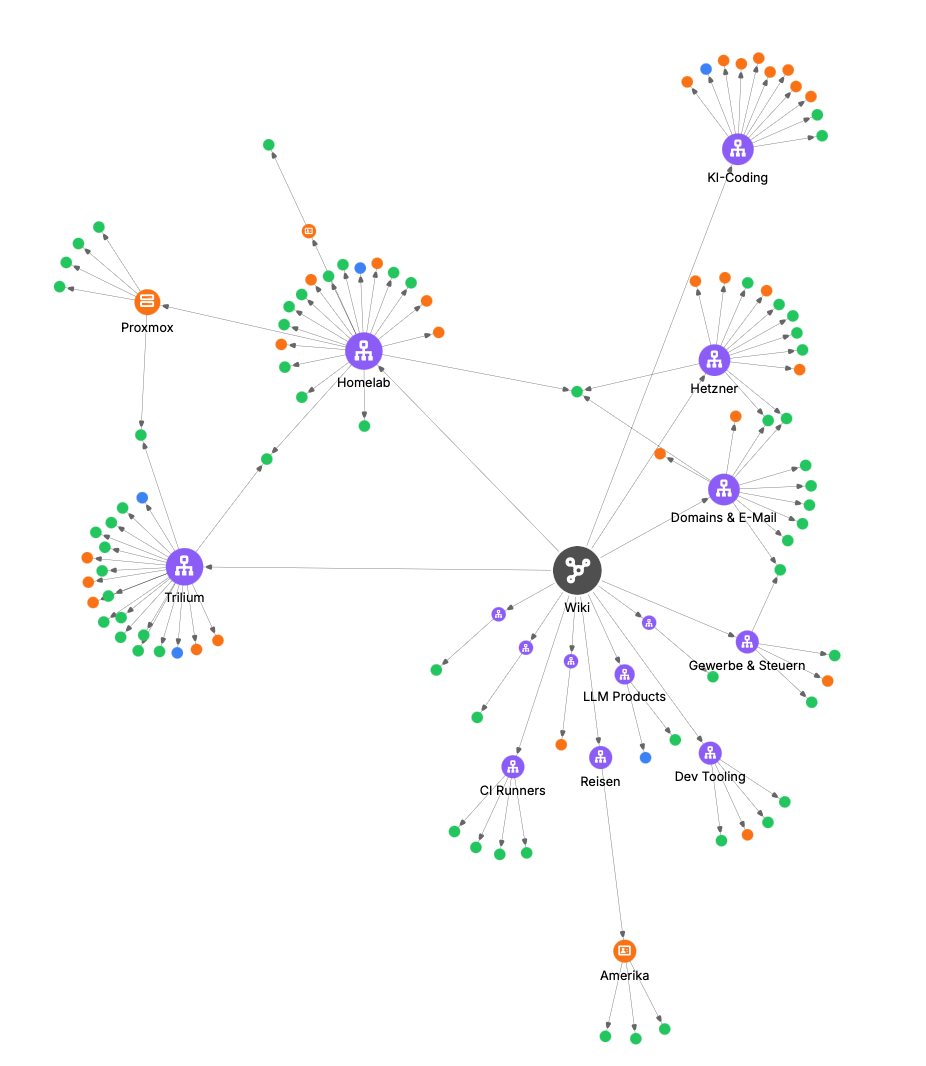
My wiki after a few weeks, as Trilium's note map: hubs in violet, concepts green, entities orange, source summaries blue.
Why Trilium fits so well
The pattern needs Trilium has metadata on every page labels and promoted attributes, set by templates a graph of linked pages internal links and relations, and the note map to look at it pages of a few kinds templates (hub, concept, entity, source summary) "what still needs work?" saved searches: pending sources, stubs, drafts, orphans a log of what changed the journal's day note raw sources that stay untouched a #readOnlySources subtreeHow it works
- One request sets it up: a Schema note, read-only Sources, the Wiki, four templates, saved-search views, two note maps and a lock folder.
- The rules live in your Trilium: the schema note says how pages are written, linked and reviewed. Claude reads it before every write, and you change the wiki's conventions by editing that note.
- Workflows:
- ingest a source: Claude writes a summary, updates the concept and entity pages it touches, creates placeholder pages for new topics, and logs the change in the day note;
- query the wiki;
- lint it;
- adopt a finding from a work session.
- You stay the editor: Claude writes drafts marked AI-assisted, and only you set a page to reviewed.
- Safe with several sessions: a small write lock (a queue of claim notes) stops two Claude sessions from overwriting each other's changes.
What goes in
- Articles and links. I save them to Karakeep. A small sync job I wrote, karakeep-trilium-sync, puts them under Sources, and "ingest" does the rest.
- My own chats with Claude. At the end of a session I just say "put this in the wiki". Claude summarizes what we figured out or decided and files it into the pages it belongs to, so a fix, a decision or a "this is how it actually behaves" doesn't get lost when the chat ends.
Finding things again
A wiki is only useful if the assistant actually looks things up. That's what trilium-recall is for (my post about it): it gives Claude the relevant wiki pages before it answers, and the wiki's structure helps it rank them, with wiki pages first and sources shown as their summaries. It works on any Trilium, so it has its own post.
Try it
You need Trilium 0.106+ with the MCP server switched on (Options → AI / LLM → MCP server). Connect it with an ETAPI token or through trilium-mcp-proxy (see discussion #12310).
/plugin marketplace add Marceltov/trilium-llm-wiki
/plugin install trilium-llm-wiki
Then ask Claude to "set up the LLM wiki", drop an article under Sources and say "ingest".
For everyday note work without a wiki (search, create, move, tag, journal, export) there's trilium-plugin; both plugins share one connection.
Feedback is welcome, especially from anyone who runs something similar: how do you structure yours?
Discussion on GitHub: TriliumNext discussion #12317.
trilium-recall: Claude remembers what you wrote in Trilium
If you connect Claude (or any AI assistant) to Trilium, it can search your notes. But it rarely does that on its own. Before starting a task, a model doesn't stop to ask "do my notes already know something about this?", because it doesn't know what it doesn't know. So it works out again things you already wrote down, or gets them wrong.
trilium-recall fixes that. It's a small container next to Trilium that indexes your notes and hands the assistant the few lines that matter. It runs as a plain MCP server, so any client can use it.
What it does
- Indexes all your text and code notes, with keyword search plus a multilingual embedding model. It handles German and English, so a German note answers an English question. It only reads Trilium through ETAPI, and you can delete its index and rebuild it at any time.
- Is just an MCP server. Add one URL to claude.ai, Claude Code or any other MCP client and you're done: there's no plugin and nothing to install on the client. The server's instructions tell the model when to call
recall. Each call returns up to three short passages with note IDs, or nothing. - Optional: runs automatically in Claude Code. A plugin adds a prompt hook that checks every prompt before Claude sees it. When your notes hold something relevant, Claude starts with it in the context. When they don't, nothing is added.
In numbers
Measured on my own Trilium (280 notes, 49 test questions); yours will differ:
- > 85 % of questions get the right note among the first three. Trilium's built-in search manages around 40 %, because it needs every word of the question in the note.
- > 90 % of questions the notes can't answer get nothing back, instead of three weak guesses.
- < 20 ms per lookup, typically.
Charts and the full comparison are on the Measurements page. The repo includes a public test Trilium, so anyone can reproduce the test numbers.
Running it
It's one compose service next to Trilium, plus an ETAPI token and a password:
  trilium-recall:
    image: ghcr.io/marceltov/trilium-recall:latest
    restart: unless-stopped
    environment:
      RECALL_LOGIN_PASSWORD: ${RECALL_LOGIN_PASSWORD}   # openssl rand -hex 32
      RECALL_BASE_URL: https://recall.example.org       # public URL; turns on the OAuth login
      RECALL_INSTANCES: main
      TRILIUM_MAIN_URL: http://trilium:8080
      TRILIUM_MAIN_TOKEN: ${RECALL_ETAPI_TOKEN}
    volumes:
      - recall-index:/data
    ports:
      - "8082:8082"
Then add
https://recall.example.org/mcpto your MCP client and log in once, or send the password as anAuthorization: Bearerheader. In Claude Code, for all your projects:claude mcp add --transport http trilium-recall https://recall.example.org/mcp -s user # then /mcp → Authenticate, and log in with RECALL_LOGIN_PASSWORDOn claude.ai, go to Customize → Connectors → Add custom connector and use the same URL. That's the whole setup.
Optional: if you use Claude Code and want recall on every prompt, without the model deciding when to look:
/plugin marketplace add Marceltov/trilium-recall
/plugin install trilium-recall
Details: how it works, run the engine, connect Claude.
It started inside my LLM wiki and understands its structure when there is one, but it works on any Trilium. An embedding model inside Trilium itself seems unlikely given Trilium's contribution rules (everything must work offline, and the bundle should stay small), so a separate container felt like the right place.
It's licensed AGPL-3.0-or-later. Feedback is welcome, and I'd love to hear how it does on other people's notes: the docs show how to measure your own.
Discussion on GitHub: TriliumNext discussion #12316.
trilium-recall 0.6.0
Merge pull request #4 from Marceltov/drop-migrating
Docs: drop the migration page
Engine image
ghcr.io/marceltov/trilium-recall:0.6.0— deploy it next to Trilium and connect Claude Code with thetrilium-recall-setupskill. Guide: https://trilium-recall.marceltov.de/trilium-mcp-proxy 0.1.1
Image:
ghcr.io/marceltov/trilium-mcp-proxy:0.1.1. Setup: see the README.trilium-llm-wiki 0.4.1
Merge pull request #11 from Marceltov/trilium-llm-wiki-10-recall-first-lookups
TRILIUM-LLM-WIKI #10: Look things up recall-first, without loading the schema
Recall engine image
ghcr.io/marceltov/trilium-llm-wiki-recall:0.4.1— deploy it next to Trilium and connect the plugin with thetrilium-recall-setupskill. Guide: https://trilium-llm-wiki.marceltov.de/recall/
Oct 16
karakeep-trilium-sync 0.1.0
Add a setup guide
Co-Authored-By: Claude Opus 5.5 noreply@anthropic.com Claude-Session: https://claude.ai/code/session_01QH9FSBayyUwfMTcRvoTAJA